




A woman reading the news on her iPad (Photo by Ground Picture on Shutterstock)
StudyFinds compiles lists of consensus picks featured on credible review sites. We aim to lay out top consumer research finds for you by bringing expert rankings to one place.
RSS feeds are popular ways for folks to consume internet news and media. Called both RDF Site Summary and Really Simple Syndication, RSS feeds are an easy way to keep track of rapidly updated web sources. Perfect for news, interesting articles, and even celebrity gossip, RSS apps offer a standardized format that makes browsing frequently checked news sources an easier experience. Our list of the top seven best RSS apps focuses on a user-friendly experience.
An RSS feed is like a personal notification system for websites you want to keep up with. Here’s how it works: Websites you like can have an RSS feed (think of it as a special channel). You can use a free RSS reader app (like a program or phone app) to subscribe to those feeds. Then, whenever the website publishes something new, the RSS reader will send you a quick alert, like a mini headline. StudyFinds searched through 10 expert reviews to rank the best RSS apps available today. Let us know your favorites in the comments below!
The List: Best RSS Apps Most Recommended by Experts
1. Feedly
Did you hear about our new landing page? 🌟
A revamped interface designed to streamline your exploration of our offerings: #ThreatIntelligence, #MarketIntelligence, and #NewsReader.
Each now has its own dedicated space, making navigation smoother.
👇https://t.co/3nnDDLoQ9Y pic.twitter.com/YqTJJrqMln
— Feedly (@feedly) March 19, 2024
Forget the days of drowning in a sea of bookmarks and browser tabs. Feedly is a favorite among users for its smooth interface, and it’s celebrating its 15th birthday! No more scrambling to find that must-read article or that hilarious cat video you stumbled upon earlier. It’s like having your favorite news outlets, blogs, and websites all tucked away in a digital magazine rack, perfectly organized and ready to be flipped through at your leisure, IFTTT raves.
Unlike some fly-by-night apps, Feedly boasts a long track record of keeping users informed. And the best part? Feedly’s interface is refreshingly simple, so even casual web browsers can ditch the digital clutter and become curators of their own online content experience, Earthweb adds.
Feedly goes beyond just organization. Think of it as your personalized online clubhouse – a place to share interesting tidbits with friends, jot down notes for future reference, and become a search whiz with their powerful search tool, Bloggingwizard exclaims. So ditch the digital rolodex of bookmarks and browser tabs, and give Feedly a try. It might just be the key to unlocking a smoother, more organized online experience.
2. Inoreader
Introducing new app icons for iOS! 📱 Customize your menu with vibrant color combos, support causes dear to your heart, or represent your favorite fandom. Get the latest app version and choose your style! ✨ pic.twitter.com/EidkDGvMyQ
— Inoreader (@Inoreader) August 16, 2023
Praised for its robust customization options, Inoreader is like your personal news butler, ready to tailor your online experience to your every whim. It’s user-friendly interface makes it a breeze to navigate for beginners and a playground of possibilities for power users, Wired comments. But Inoreader goes beyond the basics. Think of it as a universal content hub – RSS feeds, email newsletters, Facebook updates, even your favorite podcasts and Telegram channels – all neatly organized and delivered straight to your digital doorstep.
Plus, Inoreader acts as your social media ninja, letting you connect and automate updates from all your favorite platforms, adds Integrately. Feeling burned out by endless scrolling and irrelevant posts? Inoreader can be your social media infiltration system, helping you filter out the noise and focus on what truly matters to you.
Inoreader understands that one size doesn’t always fit all when it comes to news consumption. That’s why they offer a two-tiered system, like a build-your-own-adventure for information explorers, according to IFTTT. If you’re dipping your toes into the world of RSS readers, Inoreader’s free version is a great place to start. You can subscribe to your favorite news sources, organize your feed, and enjoy a steady stream of fresh content. But for the curious minds who crave more, Inoreader offers a premium version. It comes with features like unlimited feeds and advanced search options for laser-focused information retrieval.
3. NewsBlur
Also if I remember correctly, @rynbtmn also came up with the iconic double stripe story title design. pic.twitter.com/cb1XoCyIKT
— NewsBlur (@NewsBlur) December 17, 2021
Forget fancy AI or flashy YouTube integrations – NewsBlur is all about getting back to the basics. Here, you can focus on what truly matters: quality content that feeds your curiosity and keeps you informed. NewsBlur isn’t about casting a wide net and hoping to catch something interesting, says Wired. Instead, it allows you to tailor your news intake with RSS feeds, ensuring you get a steady stream of articles from your favorite sources, all in one place.
According to users, what sets NewsBlur apart is its unique focus on building a community around the news you care about. Unlike other RSS readers that leave you isolated in your own personalized news silo, NewsBlur offers social integration, like a digital coffee shop for fellow news enthusiasts, explains IFTTT. Here, you can connect with like-minded readers, share articles that pique your interest, and spark conversations about the stories that matter. Find fellow history buffs to dissect the latest archeological discoveries or connect with tech gurus to debate the newest gadget on the market.
Organize your favorite articles with categories and tags, creating a personalized filing system for all the information you encounter, writes Bloggingwizard. Don’t like a story? Vanish it with a click! See something amazing? Highlight it for future reference. And for those who love to share, NewsBlur lets you broadcast your favorite finds directly to your blog, sparking conversations and inspiring others with your sharp eye for newsworthy content.
4. Feedreader
What is #RSS? And why it deserves a tryhttps://t.co/LASekhxnjr😀#FeedReader #news pic.twitter.com/szrosoYU5t
— FeedReader Online (@FeedReaderOn) July 18, 2017
Think of Feedreader as your personal oasis in the information desert. Here, you can customize your news experience and curate a stream of content that truly interests you. According to Make Use Of, the layout is refreshingly intuitive. On the left-hand side, you’ll find a handy menu bar – your command center for filtering and organizing. “Starred items” let you bookmark your favorite articles for easy access later, while other categories help you sort your news by topic, ensuring you only see what you want to see.
With Feedreader, subscribing to your favorite feeds is a breeze. Think of it like collecting interesting pebbles on the beach of information – with just a few clicks, you can add the sources that pique your interest to your very own news collection, offers Content Studio. But here’s the best part: Feedreader doesn’t bury your pebbles under a pile of distracting seashells (aka ads!). This app is completely free of advertising, allowing you to focus solely on the content that matters.
The intuitive interface is clear and uncluttered, allowing you to unwind and focus on what truly matters: the stories themselves, Bloggingwizard states. But don’t be fooled by its laid-back vibe. Feedreader Online packs a punch when it comes to features. Advanced filtering tools let you hone in on the specific content you want to see. Need to catch up on everything you missed? The maximum feed capacity ensures you never run out of interesting articles to explore.
5. Feeder

Feeder is another easy-to-jump-into app that has a simple and clean-looking user interface. This app could be a great choice for users who don’t need long lists of optional features. Feeder might not win any awards for the most visually stimulating RSS reader on the market. But don’t let the minimalist design fool you, according to Lifewire. This app is like a tiny TARDIS – bigger on the inside than it appears! It also boasts a powerful “block list” feature, like a tiny bouncer at the door of your personalized news club. Annoyed by articles with clickbait headlines? Simply add those trigger words to the block list, and voila! Feeder will filter them out, ensuring your newsfeed stays focused on the topics that truly interest you.
The free version of Feeder is like a well-stocked picnic basket – it has all the essentials to get you started. You can organize your favorite news sources, personalize your reading experience, and enjoy a steady stream of fresh content, Earthweb relates. But for those who crave a little extra, there’s a premium option available for a small monthly fee. Think of it as upgrading your picnic to a gourmet spread. The paid version offers faster updates, lets you manage up to 30 feeds (enough variety to satisfy even the most curious mind!), and eliminates any pesky ads that might disrupt your reading flow.
You won’t find any fancy, experimental dishes here – just good, solid news delivered in a clear and concise format. Subscribing to your favorite sources is easy, and the interface is refreshingly uncluttered, allowing you to focus on the content itself without any unnecessary distractions, Web FX reviews. For those who value efficiency, Feeder is a champion. No more getting lost in a maze of features you don’t need. Feeder gets you straight to the good stuff, letting you quickly scan headlines, delve into interesting articles, and stay informed without the hassle.
6. The Old Reader
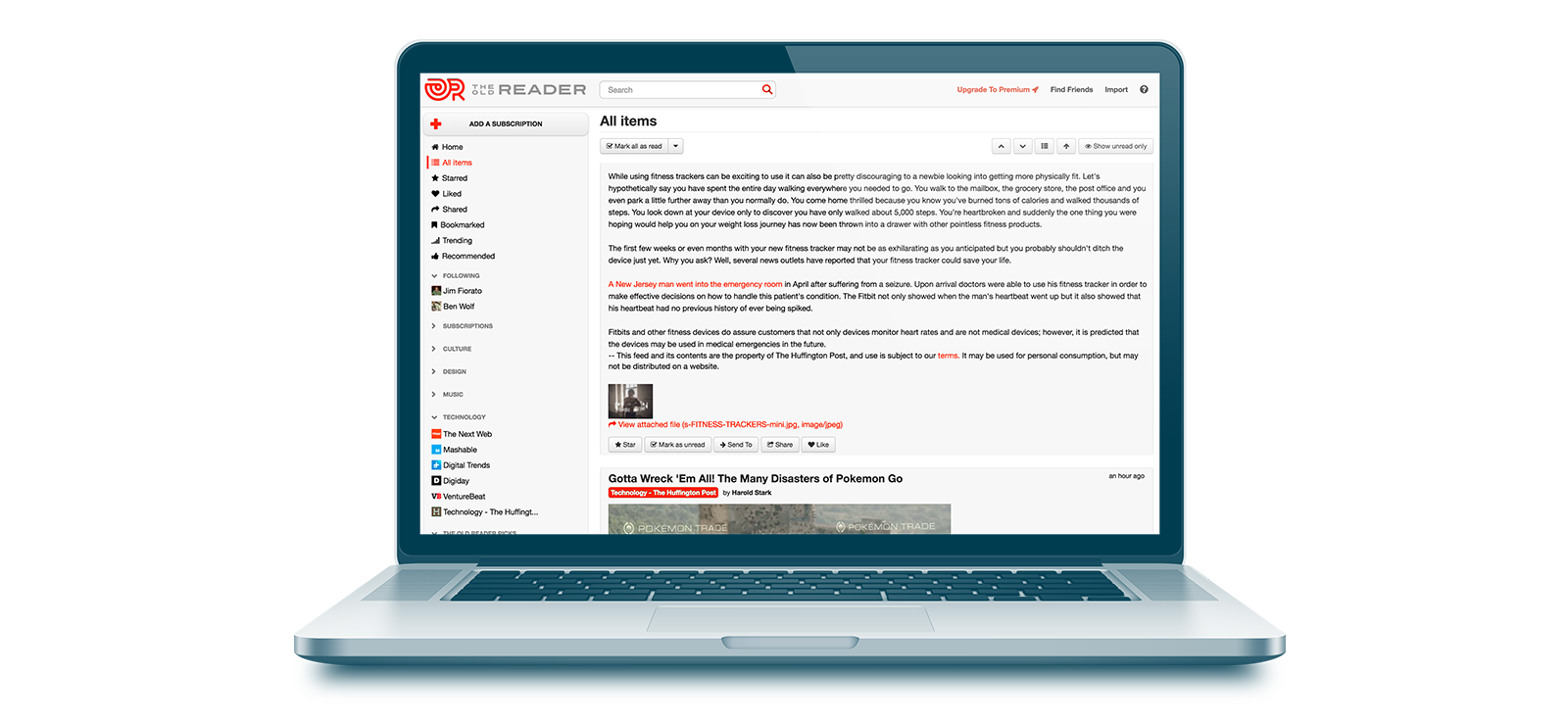
The Old Reader is an app that requires social media or Google connectivity for use. While this is great for users of those platforms, other people may shun the need for this type of data-sharing. But if you crave a way to stay informed, you can connect with friends who share your interests, transforming your news experience into a vibrant social network, writes Earthweb. Simply connect your Google or Facebook account and see if any of your friends are already brewing their news fix at The Old Reader. Follow them, and before you know it, you’ll be surrounded by a virtual community of fellow news explorers. Share articles that pique your interest, spark discussions about the latest headlines, and discover new perspectives that might have otherwise escaped your notice.
Here’s another perk: The Old Reader prioritizes keeping you up to date. It displays content in reverse chronological order, ensuring you always see the freshest headlines and stories first, Content Studio adds. No more digging through layers of older content to find the latest scoop. And the best part? The Old Reader offers a free plan that lets you explore its features. Subscribe to up to 100 feeds (enough variety to satisfy even the most curious mind!), and get a taste of the engaging, social world of news browsing it offers. Upgrade later if you crave even more features, but the free plan is a great place to start your news-reading revolution.
7. Flipboard

Flipboard is unusual in that it offers cosmetic user-interface options. The organization and presentation on this Android app are similar to popular social media sites like Reddit. The app boasts “slick animations” and a “decent user interface,” making news browsing a delight for the eyes, Android Authority says. Think of it as flipping through a personalized magazine with captivating visuals and engaging articles on the topics that matter most to you.
But don’t be fooled by the pretty pictures – Flipboard has substance to match its style. While it might not be the most feature-rich option on the market compared to giants like Feedly, Flipboard excels in user-friendliness. Navigating the app is simple, allowing you to focus on immersing yourself in the stories that capture your attention.
Imagine a news experience that’s both social and sophisticated, like a digital cocktail party for the intellectually curious. Flipboard throws a “smart magazine” soiree, displaying a curated selection of top stories from all your subscribed sources on one screen, Lifewire assures. But Flipboard isn’t just about force-feeding you pre-selected content. It empowers you to personalize the experience. Don’t like the layout? Rearrange it to your liking!
Sources:
Note: This article was not paid for nor sponsored. StudyFinds is not connected to nor partnered with any of the brands mentioned and receives no compensation for its recommendations. This article may contain affiliate links in which we receive a commission if you make a purchase.
